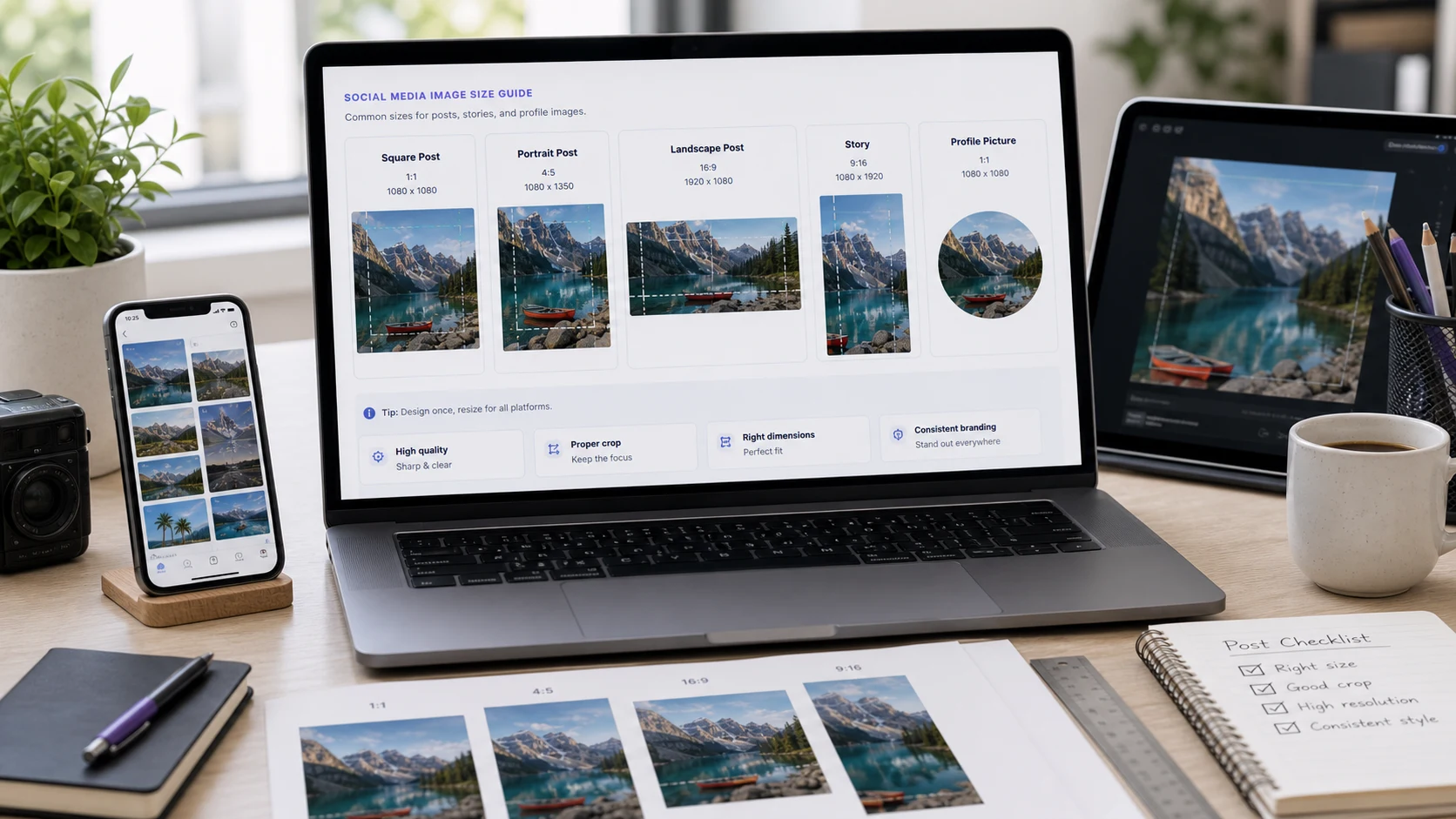
The best Instagram post size in 2026 is 1080 x 1350 pixels, a 4:5 portrait. The app also keeps 3:4 photos uncropped at 1080 x 1440. Square posts work at 1080 x 1080 and horizontal ones at 1080 x 566. Stories and Reels use 1080 x 1920. A standard YouTube thumbnail is 1280 x 720 pixels (16:9).
Below are the sizes for each format, why your photo still gets cropped on your profile, and how to resize an image to fit without squashing it.
What size is an Instagram post in 2026?
Instagram shows feed images at a width of 1080 pixels. Upload wider and it scales down. Upload narrower and it scales up, which makes the image soft. So start every post at 1080 pixels wide and choose the height by shape:
- Portrait (4:5): 1080 x 1350 px. The safe default. It fills a lot of feed space and also works for ads and scheduling tools.
- Portrait (3:4): 1080 x 1440 px. The tallest shape the app keeps uncropped when you post from your phone, and it matches the shape of a typical phone photo.
- Square (1:1): 1080 x 1080 px.
- Horizontal (1.91:1): 1080 x 566 px. Shows smallest in the feed, so keep it for wide subjects like a group shot or a skyline.
- Carousel: every slide follows the shape of the first one, so make them all the same size.
- Profile photo: 320 x 320 px is the common upload size. It's shown as a circle, so keep your face or logo in the middle.
If you schedule posts through a third-party tool, 4:5 is the safer pick. Some tools and ad placements still top out at 4:5 even though the app accepts 3:4.
Why does Instagram crop my photos on the profile grid?
In early 2025 Instagram changed the profile grid from squares to taller 3:4 tiles. Every post is previewed at 3:4 on your profile, whatever shape you uploaded. A 4:5 post loses a thin strip from each side in the grid. A square post loses more from the sides. A wide horizontal post gets cut heavily.
The fix is to keep text, faces and logos inside a centred 3:4 area. If you post at 1080 x 1350, the grid shows roughly the middle 1012 pixels of width, so leave about 35 pixels clear on the left and right edges. A 3:4 photo straight from your phone fills the grid tile exactly.
Older posts made for the square grid may now look cut off on your profile. Opening the post still shows the full image. Only the grid preview changes.
Instagram Story size and Reels size
The Instagram Story size is full-screen vertical: 1080 x 1920 pixels, a 9:16 ratio. Reels use the same size. The app overlays your profile name at the top and the reply bar or captions at the bottom. Keep important text out of those top and bottom strips.
- Stories: 1080 x 1920 px, 9:16.
- Reels: 1080 x 1920 px, 9:16.
- Reel cover in the profile grid: cropped to 3:4, so check that the cover title still reads in the smaller frame.
If you post a horizontal or square photo to a Story, Instagram places it on a coloured background. That's fine for a quick share. For a designed Story, make the image 1080 x 1920 from the start.
What is the YouTube thumbnail size?
The long-standing standard YouTube thumbnail size is 1280 x 720 pixels, which is 16:9. It still works well and is what most templates use. YouTube's thumbnail help page now lists a larger maximum and these rules:
- Videos: up to 3840 x 2160 px at 16:9, with a minimum width of 640 px.
- Shorts: up to 2160 x 3840 px at 9:16, with a minimum height of 640 px.
- Formats: image formats such as JPG or PNG.
- File size: 2 MB for video thumbnails uploaded from the mobile app, and 50 MB on desktop.
If you design at 1280 x 720 and export as JPG, you'll stay under 2 MB almost every time. If a thumbnail is rejected as too large, compress it to around 1 MB with the JPG compressor and try again. Unsure how 2 MB compares with the KB number your editor shows? See how many KB are in a MB.
Two design tips. The bottom right corner shows the video length, so keep key text out of it. And thumbnails appear tiny on phones, so use a few large words at most.
Social media image sizes: quick reference
Here's everything in one list. The Instagram and YouTube sizes come from the details above. The Facebook, X and LinkedIn sizes are the commonly recommended ones in current platform guides, so test on your own account before a big campaign.
- Instagram post: 1080 x 1350 px (4:5), or 1080 x 1440 px (3:4) from the app.
- Instagram square: 1080 x 1080 px.
- Instagram Story and Reel: 1080 x 1920 px (9:16).
- YouTube thumbnail: 1280 x 720 px (16:9), up to 3840 x 2160.
- YouTube Shorts thumbnail: 9:16, up to 2160 x 3840.
- Facebook feed post: 1080 x 1080 px. Facebook cover photo: 851 x 315 px.
- X (Twitter) post image: 1280 x 720 px. X header: 1500 x 500 px.
- LinkedIn shared link image: 1200 x 627 px. LinkedIn cover photo: 1584 x 396 px.
Cover and header images crop differently on phones and desktops, and a profile photo often sits on top of them. Keep anything important near the middle and check both views.
How to resize an image for Instagram or YouTube
Resizing straight to 1080 x 1350 from a different shape would stretch the image. You need to crop to the right ratio first, then scale. ConvertorLab's Resize Image tool has Instagram and YouTube presets and an Exact (cover) mode that does both in one step.
- Open the Resize Image tool and add your photos. Several at once is fine.
- Pick a preset, such as Instagram portrait or YouTube thumbnail, or type the pixel size.
- Choose Exact (cover) mode so the image fills the frame and the extra edges are trimmed.
- Preview the result. If the trim cut off something important, crop by hand first with the Crop Image tool using the 4:5, 9:16 or 16:9 ratio, then resize.
- Download. For YouTube, set a maximum file size under 2 MB so the thumbnail is accepted from any device.
The files are processed in your browser, so nothing is uploaded until you post it yourself.
How to stop Instagram making your photos blurry
- Upload at 1080 pixels wide. Much larger files get recompressed harder, and smaller ones get stretched.
- Use JPG for photos. Instagram converts uploads anyway, and a clean, well-sized JPG survives that best. Our JPG vs JPEG explainer covers why the format suits photos.
- Avoid tiny text. What reads on a monitor can be unreadable on a phone at feed size.
- Check the app's upload quality setting. Instagram has an Upload at highest quality switch under Data usage and media quality. If it's off, uploads may be compressed harder.
- Post on a good connection. Uploads over a weak signal can come out softer.
Free tools that run in your browser
Frequently asked questions
What is the best Instagram post size in 2026?
1080 x 1350 pixels (4:5 portrait) is the safe default. The app also keeps 3:4 photos uncropped at 1080 x 1440, and square 1080 x 1080 still works.
What is the Instagram story size?
Stories and Reels are 1080 x 1920 pixels, a 9:16 vertical ratio. Keep text away from the very top and bottom where the app places its buttons.
What size is a YouTube thumbnail?
1280 x 720 pixels at 16:9 is the standard. YouTube accepts thumbnails up to 3840 x 2160, with a minimum width of 640 pixels.
What is the YouTube thumbnail file size limit?
YouTube's help page lists 2 MB for video thumbnails uploaded from the mobile app and 50 MB on desktop. Staying under 2 MB works everywhere.
Why is my Instagram post cropped on my profile?
Instagram's profile grid shows every post as a 3:4 tile. Keep important content in a centred 3:4 area so the grid preview doesn't cut it off.
Can I post a 9:16 photo to the Instagram feed?
A 9:16 image is cropped in the feed, because the tallest uncropped feed shape is 3:4. Use 9:16 for Stories and Reels, and 4:5 or 3:4 for feed posts.