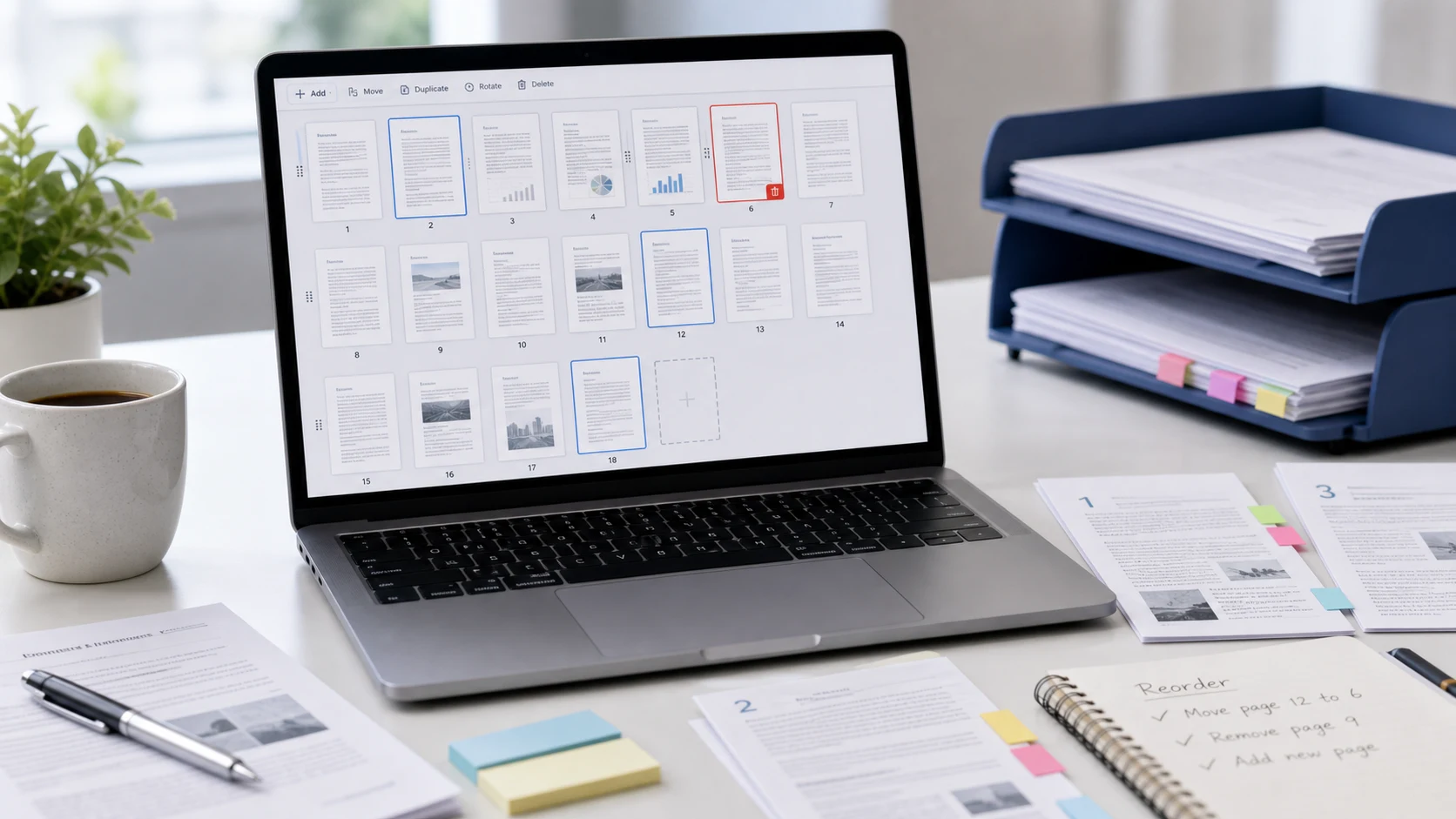
To reorder PDF pages, open the file in a tool that shows page thumbnails, drag the pages into the order you want, and save. On a Mac, Preview does this in its thumbnail sidebar. On any device, a free browser organizer lets you drag, rotate and delete pages, then download the fixed copy.
Below are the steps for each device, how to rotate a PDF so the change sticks, and a fix for the classic scan where every second page is out of place.
How to reorder PDF pages free in your browser
ConvertorLab Organize PDF works in Chrome, Edge, Safari or Firefox on a computer or phone. It runs inside the browser tab, so the file isn't uploaded, and it's free with no watermark.
- Open Organize PDF and add your file.
- Wait for the page thumbnails to load.
- Drag each page to its new position. The finished PDF follows the order on screen.
- Save and download the new PDF.
The organizer copies pages as they are, so quality doesn't change. It also handles the jobs that usually come with reordering:
- Rotate a single page with the button on its thumbnail.
- Delete blank or duplicate pages.
- Insert pages from another PDF, an image such as a phone photo of a receipt, or a blank page.
If removing pages is the main job, the guide on how to delete pages from a PDF covers every device.
How to rearrange pages in PDF on Mac with Preview
Apple's guide to adding, deleting or moving PDF pages describes the method.
- Open the PDF in Preview. Use File > Duplicate first if you want to keep the original order, because Preview saves edits automatically.
- Choose View > Thumbnails, or View > Contact Sheet for a bigger grid of pages.
- Drag pages to their new positions.
- Close the window or press Command-S.
Contact Sheet helps with long documents. It shows many pages at once, so you can drag page 30 to page 2 without scrolling a narrow sidebar. You can also drag thumbnails between two open PDFs to move pages from one file into another.
How to rotate and save a PDF
A sideways page needs a rotation saved into the file. The rotate button in a browser's PDF viewer often changes only your view, and the page comes back sideways the next time someone opens it. Use one of these instead.
In the browser organizer
- Open the PDF in Organize PDF.
- Click the rotate button on each page that needs turning. Only that page turns.
- Save and download the new file.
In Preview on a Mac
These steps follow Apple's guide to rotating a PDF.
- Choose View > Thumbnails and select the pages to turn. Command-click to select several.
- Click the Rotate Left button in the toolbar to turn them counterclockwise.
- To turn them clockwise, hold Option and click the same button.
- Save with Command-S.
To rotate a whole PDF, select every thumbnail first (Command-A in the sidebar) and rotate them together.
On iPhone
Open the PDF in the Files app and swipe right from the left edge to show thumbnails. Tap the menu on a page and choose Rotate Left or Rotate Right. Files saves the change when you close the document.
How to rearrange PDF pages on iPhone and Android
The iPhone Files app can rotate, insert and delete pages from its thumbnail menu. On iOS 26 and later, the Preview app also handles reordering: open the PDF, show the page thumbnails and drag pages to change the reading order. Touch and hold a page for insert, rotate and delete options.
On older iPhones and on Android, the browser organizer does the job:
- Save the PDF to Files on an iPhone, or to Downloads on Android.
- Open Organize PDF in Safari or Chrome and tap the upload area to pick the file.
- Press and hold a page thumbnail, then drag it to its new spot. Use the rotate and delete buttons as needed.
- Save and download. The new copy appears with your other downloads.
On a small screen, zoom out in the browser so more thumbnails fit. A long document is still easier on a computer, but a quick fix to a three-page form is fine on a phone.
How to fix the page order of a double-sided scan
Scanning a double-sided document on a single-sided scanner usually gives you all the fronts, then all the backs. Pages come out as 1, 3, 5, 2, 4, 6 instead of 1 to 6. Dragging each page works for a short file. For a long one, this is quicker:
- Use Split PDF to save the fronts and backs as two separate files if they aren't already.
- Check whether the backs are in reverse order. Flipping a stack to scan the other side often reverses it.
- Open the fronts file in Organize PDF and insert the back pages after each front, working from the start.
- Scroll through the result and confirm the printed page numbers run in sequence.
Backs often come out upside down, too. Rotate them 180 degrees while you're in the organizer.
How to rearrange PDF pages on Windows
Windows doesn't include a PDF page editor. File Explorer can't do it, and Edge's PDF viewer reads and annotates files but doesn't move pages. Your options are the browser organizer above, which runs in Edge or Chrome with nothing to install, or Adobe Acrobat Pro, which has an Organize Pages tool if you already pay for it.
Avoid opening a PDF in Word to shuffle pages around. Word converts the PDF into an editable document, and the layout rarely survives the trip back.
Before you save the reordered PDF
A wrong page order is easy to miss in small thumbnails, and the person receiving the file will notice it first. Spend a minute on these checks:
- Read the first line of each page to confirm it follows the last line of the one before.
- Look at pages at full size to catch any that are still sideways or upside down.
- Check the page count matches what you expected, with nothing lost or doubled.
- If the document has printed page numbers, make sure they run in sequence. They're the quickest way to spot a page in the wrong place.
- Rename the file so it's clear which copy is fixed, for example adding "final" or the date.
Keep the original until you've sent the fixed copy. If you find a mistake later, you can start again from the untouched file instead of reordering a reordered one.
Need to join several files first? Merge them, then reorder the combined file in one pass. The guide to merging PDF files has the steps.
Free tools that run in your browser
Frequently asked questions
How do I rearrange pages in a PDF?
Open the file in a page organizer or Mac Preview's thumbnail view, drag pages into the order you want, and save.
How can I reorder PDF pages free without Acrobat?
Use Mac Preview, the Preview app on iOS 26 and later, or a free browser organizer that runs in any browser on Windows, Android or Chromebook.
How do I rotate and save a PDF?
Rotate the pages in Organize PDF or Mac Preview and save the file. The rotate button in a browser viewer often doesn't save the change.
Can I rotate just one page in a PDF?
Yes. In Organize PDF, press the rotate button on that page's thumbnail. In Preview or the iPhone Files app, select only that page before rotating.
Does rearranging PDF pages reduce quality?
No. Reordering and rotating copy the pages as they are, so text and images stay the same.